- DATE:
- AUTHOR:
- The Cotality LoanSafe Team
LoanSafe | Product Release 01/20/2025
Targeted for production deployment the early morning (1 a.m. PT) of Jan. 20, 2025, Release 012501 includes:
Contents:
Enhancements
Improve NMLS Company Name Search
Update NMLS Alert Logic
New Alerts
Update LoanSafe Connect Login Page
Include a Whitelisted Icon in the Confirmation of Searches Performed
Remove Comments Section from LoanSafe Collateral Manager
Bug Fixes
Hide Nearby Sales Section in LoanSafe Collateral Manager when There is No Data.
Enhancements
Improve NMLS Company Name Search
When the LoanSafe requests contained a company Name of 0 or 0.0, multiple inaccurate results were returned. The search will no longer search on 0 or 0.0. The search will be done on the Company NMLS ID when present in the request.
BEFORE:

AFTER:

Update NMLS Alert Logic
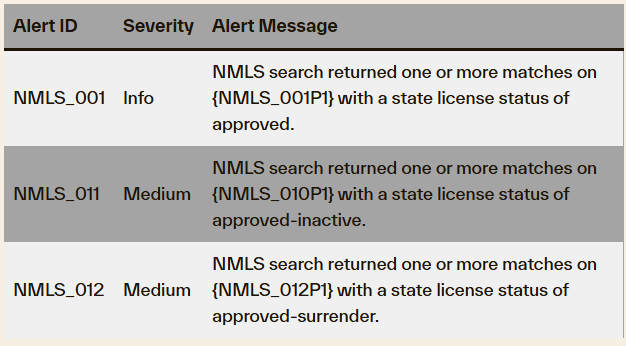
The logic for NMLS_001, NMLS_011 and NMLS_012 has been updated so that the alerts do not fire together.
New Alerts
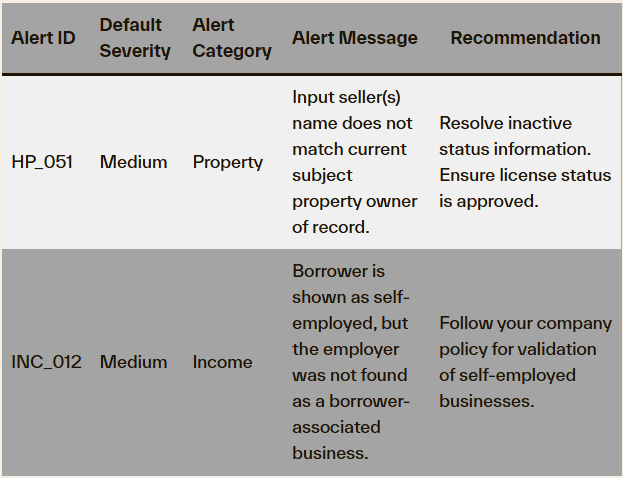
The following new alerts have been created. These alerts will be deployed OFF for all alert configurations. Our Science and Analytics team will monitor the firing of these alerts to determine accuracy and efficacy.
Update LoanSafe Connect Login Page
The “Forgot Password” link and verbiage have been updated:
BEFORE:

AFTER:

Include a Whitelisted Icon in the Confirmation of Searches Performed
A new icon has been added to the Confirmation of Searches Performed to identify when a loan participant has been whitelisted.
BEFORE:

AFTER:

Remove Comments Section from LoanSafe Collateral Manager
The Review Comments section in LoanSafe Collateral Manager has been removed. This field was not utilized and not considered beneficial.
BEFORE:

AFTER:

Bug Fixes
Hide Nearby Sales Section in LoanSafe Collateral Manager when There is No Data
When there are no nearby sales in LoanSafe Collateral Manager, the section will now be hidden as it is in other reports in the LoanSafe Suite.
Note: Because the LoanSafe Suite comprises LoanSafe Risk Manager, Fraud Manager and Collateral Manager, all changes and additions apply to all versions of the LoanSafe report unless otherwise noted.
For more information on this release contact your account representative or email [email protected].