- DATE:
- AUTHOR:
- The Cotality LoanSafe Team

LoanSafe | Product Release
Production deployment on June 9, 2026. This post provides information on the release of the LoanSafe Suite within Encompass Partner Connect.
Enhancements
Support for Additional Loan Participants via Custom Form
Bug Fixes:
Trailing Whitespace in Contact Name
Reminders:
LoanSafe Final Check
Images not displaying? Depending on your Outlook settings, you might need to select “Download external images” to see the images in this note.
1. Enhancements:
Support for Additional Loan Participants via Custom Form
We are introducing a new feature that enables clients to add additional loan participants (referred to as “Loan Actors”) to the LoanSafe request via custom fields and a custom form in Encompass Partner Connect.
Previously, only File and Milestone Contacts were included in the LoanSafe request, requiring custom contacts to be screened manually against watchlists.
With this enhancement, Custom Contacts are now included in the LoanSafe request and automatically screened against the appropriate watchlists.
What’s New
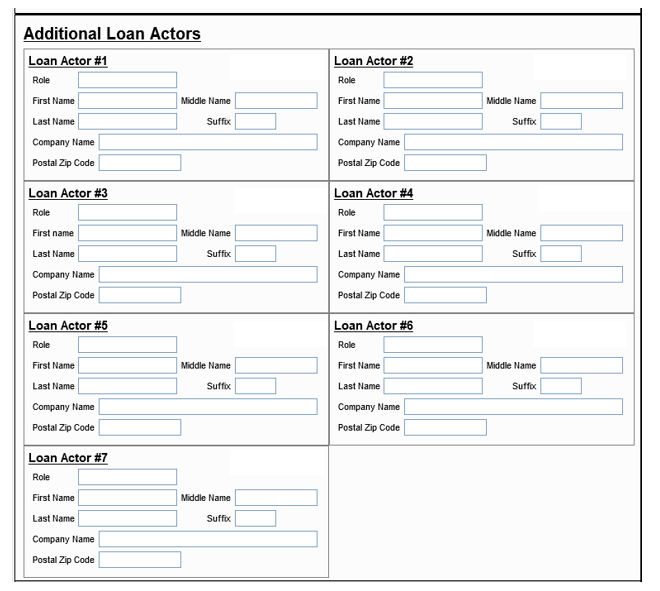
Clients can now create a custom Encompass form to capture up to 7 additional loan participants
Each participant can include:
Role
First Name
Middle Name
Last Name
Suffix
Company Name
Postal Zip Code
Important Considerations
A maximum of 7 additional loan participants is supported
Extension fields are shared across multiple data elements, requiring controlled allocation
With this release, deselected custom contacts will still be included in the LoanSafe request
Support for excluding deselected custom contacts from the LoanSafe request will be introduced in a subsequent release
Configuration Overview
To leverage this functionality, you will need to:
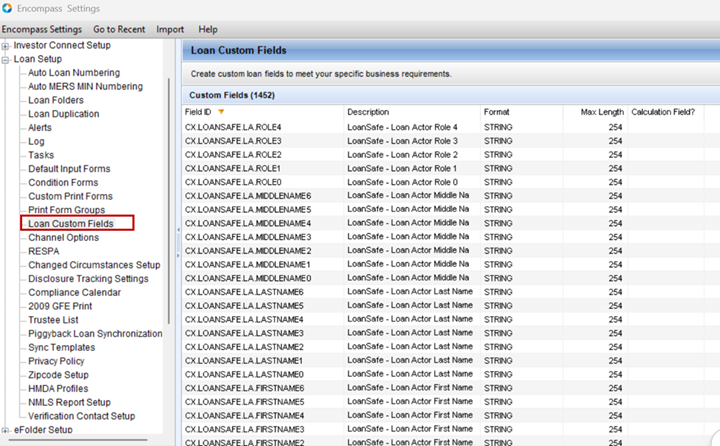
Create custom fields in Encompass to store additional participant data
Build a custom form to capture participant details within the loan file
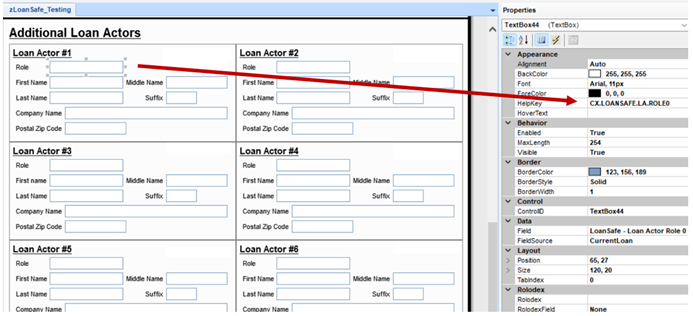
Map the custom fields to the custom form
Map the LoanSafe fields (list below) to custom fields via EPC Admin "Field Mapping."
Field ID | Description | Data Type | Format | Length |
loanActorRole | Role | String | String | 254 |
loanActorFirstName | First Name | String | String | 254 |
loanActorMiddleName | Middle Name | String | String | 254 |
loanActorLastName | Last Name | String | String | 254 |
loanActorSuffix | Suffix | String | String | 10 |
loanActorCompanyName | Company Name | String | String | 254 |
loanActorPostalCode | Zip | Zipcode | String | 10 |
loanActorRole1 | Role | String | String | 254 |
loanActorFirstName1 | First Name | String | String | 254 |
loanActorMiddleName1 | Middle Name | String | String | 254 |
loanActorLastName1 | Last Name | String | String | 254 |
loanActorSuffix1 | Suffix | String | String | 10 |
loanActorCompanyName1 | Company Name | String | String | 254 |
loanActorPostalCode1 | Zip | Zipcode | String | 10 |
loanActorRole2 | Role | String | String | 254 |
loanActorFirstName2 | First Name | String | String | 254 |
loanActorMiddleName2 | Middle Name | String | String | 254 |
loanActorLastName2 | Last Name | String | String | 254 |
loanActorSuffix2 | Suffix | String | String | 10 |
loanActorCompanyName2 | Company Name | String | String | 254 |
loanActorPostalCode2 | Zip | Zipcode | String | 10 |
loanActorRole3 | Role | String | String | 254 |
loanActorFirstName3 | First Name | String | String | 254 |
loanActorMiddleName3 | Middle Name | String | String | 254 |
loanActorLastName3 | Last Name | String | String | 254 |
loanActorSuffix3 | Suffix | String | String | 10 |
loanActorCompanyName3 | Company Name | String | String | 254 |
loanActorPostalCode3 | Zip | Zipcode | String | 10 |
loanActorRole4 | Role | String | String | 254 |
loanActorFirstName4 | First Name | String | String | 254 |
loanActorMiddleName4 | Middle Name | String | String | 254 |
loanActorLastName4 | Last Name | String | String | 254 |
loanActorSuffix4 | Suffix | String | String | 10 |
loanActorCompanyName4 | Company Name | String | String | 254 |
loanActorPostalCode4 | Zip | Zipcode | String | 10 |
loanActorRole5 | Role | String | String | 254 |
loanActorFirstName5 | First Name | String | String | 254 |
loanActorMiddleName5 | Middle Name | String | String | 254 |
loanActorLastName5 | Last Name | String | String | 254 |
loanActorSuffix5 | Suffix | String | String | 10 |
loanActorCompanyName5 | Company Name | String | String | 254 |
loanActorPostalCode5 | Zip | Zipcode | String | 10 |
loanActorRole6 | Role | String | String | 254 |
loanActorFirstName6 | First Name | String | String | 254 |
loanActorMiddleName6 | Middle Name | String | String | 254 |
loanActorLastName6 | Last Name | String | String | 254 |
loanActorSuffix6 | Suffix | String | String | 10 |
loanActorCompanyName6 | Company Name | String | String | 254 |
loanActorPostalCode6 | Zip | Zipcode | String | 10 |
2. Bug Fixes:
Trailing Whitespace in Contact Name
Issue: Trailing whitespace in contact names caused incorrect parsing, preventing the contact from being included in watchlist screening.
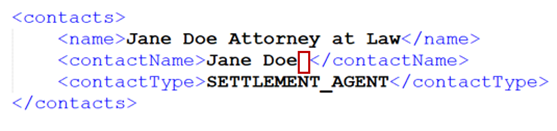
In this scenario, the contact’s name was misinterpreted as:
First Name: Jane
Middle Name: Doe
Last Name: blank/whitespace
Due to this parsing error, the affected contact was not properly processed for watchlist screening.

Resolution:
The trailing whitespace is now trimmed prior to parsing, ensuring accurate name handling and successful screening.
3. Reminder:
When to Use LoanSafe Final Check
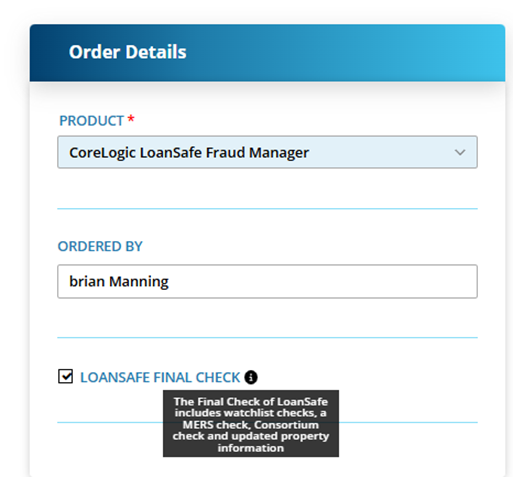
LoanSafe Final Check is a limited version of LoanSafe designed to be run at or near closing. It performs targeted checks ONLY, including:
Watchlist screening
MERS check
Consortium check
Updated property information
User Notes:
The Final Check option may remain selected on the order screen - please confirm before submitting
Running a full LoanSafe report after a Final Check will reset previously cleared alerts
Summary
LoanSafe Final Check is intended as a targeted, final validation step—not a replacement for the full LoanSafe report. Proper use ensures efficient screening at closing while maintaining comprehensive risk coverage earlier in the loan process.
Note: Because the LoanSafe Suite comprises LoanSafe Risk Manager, Fraud Manager, and Collateral Manager, all changes and additions apply to all versions of the LoanSafe report unless otherwise noted.
For more information on this release, contact your account representative or email [email protected].