- DATE:
- AUTHOR:
- The Cotality LoanSafe Team
LoanSafe | Product Release
Production deployment on July 14, 2026. This post provides information regarding enhancements in Release 072607 of the LoanSafe Suite.
Enhancements
New FAQs
Most Recent Listing Information (MLS)
LoanSafe Connect Review Status
Update Verbiage for the LoanSafe Connect Review Status
New Client Watchlist Alerts
Appraiser License match
NMLS ID match
Display the Seller Corporation Officers from File Contacts on the LoanSafe Order Screen
Bug Fixes:
Retain Alert Clearing Across Orders
Bug fix: Trim Spaces from the Appraiser Search Results
Enhancements
New FAQs
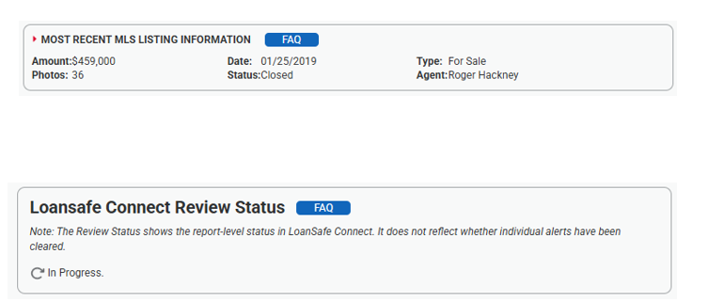
FAQs are now available within both the Most Recent Listing Information section and the LoanSafe Connect Review Status. Selecting the FAQ button opens a detailed list of commonly asked questions and answers in a new browser window.
Update Verbiage for the LoanSafe Connect Review Status
Enhanced the LoanSafe Connect Review Status with additional context to improve user understanding of what the status represents, reducing confusion during review.

New Client Watchlist Alerts
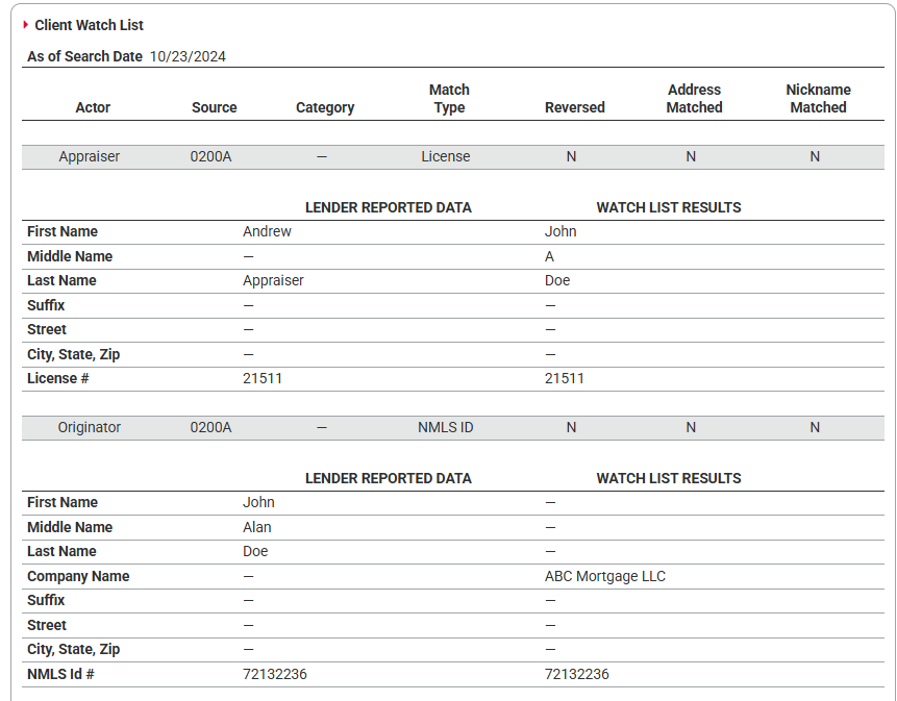
Two new alerts have been introduced for clients using custom watchlists that include an appraiser license number or NMLS ID. These alerts will trigger when the input license number or NMLS ID matches an entry on the watchlist. These alerts are based on exact matching of both the identifier and the license type. The license type must be explicitly defined as “Appraiser” or “NMLS” in the watchlist. Entries with incorrect values will not trigger these alerts. Name matching is not performed for these alerts.
Alert ID | Severity | Message | Recommendation |
WAT_037 | High | Appraiser license match found on Client-Supplied Watch List for {role} | Verify the license number and confirm the identity of the associated third party, as name discrepancies may exist. |
WAT_038 | High | NMLS ID match found on Client-Supplied Watch List for {role} | Verify the NMLS ID and confirm the identity of the associated third party, as name discrepancies may exist. |
Display the Seller Corporation Officers in the LoanSafe Order Screen (EPC)
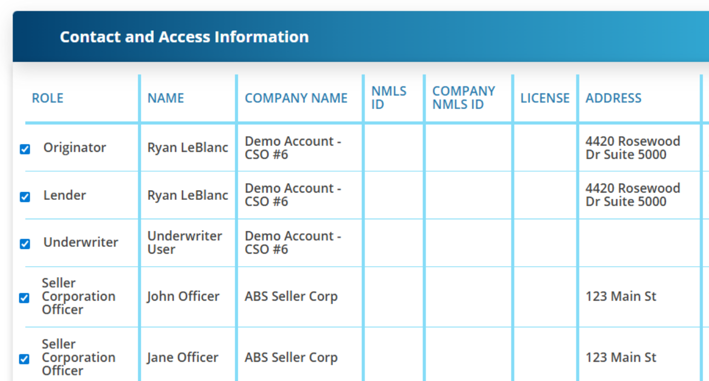
Seller Corporation Officers from File Contacts are now displayed in the LoanSafe Order Screen under Contact and Access Information, improving visibility and access to key contact details during order review. This enhancement is only within Encompass Partner Connect (EPC).
Bug Fixes
Retain Alert Clearing Across Orders
Resolved an issue where cleared alerts were not retained between the LoanSafe Final Check and subsequent full reports. Alerts that have been previously reviewed and cleared will now persist across report types, ensuring consistent alert status and reducing rework.
Trim Spaces from the Appraiser Search Results
Resolved an issue where valid Wisconsin appraiser licenses could incorrectly trigger ASC_002; “ASC search returned a match on {ASC_002P1} with state license status other than active”
Recent changes to the state's license number formatting introduced spaces around dashes, causing mismatches during license validation. LoanSafe now normalizes the license format prior to validation to ensure active licenses are correctly identified.
Note: Because the LoanSafe Suite comprises LoanSafe Risk Manager, Fraud Manager and Collateral Manager, all changes and additions apply to all versions of the LoanSafe report unless otherwise noted.
For more information on this release, contact your account representative or email [email protected].