- DATE:
- AUTHOR:
- The Cotality LoanSafe Team
LoanSafe | Product Release
This post outlines enhancements to the LoanSafe Suite in Encompass Partner Connect. This release is scheduled for October 25, 2026, at 1:00 a.m. This release also includes general maintenance updates and routine security enhancements. These improvements optimize overall system performance and help keep our application protected against known security vulnerabilities.
Encompass Partner Connect (EPC) Enhancements:
Support for SARA and Liens & Judgments in Automated Ordering Templates
Configurable display of LoanSafe Final Check
Enhancements:
1. Support for SARA and Liens & Judgments in Automated Ordering Templates
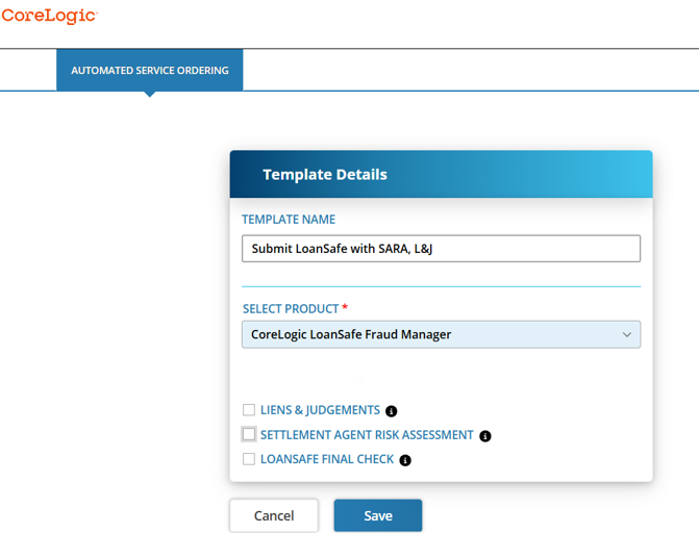
Settlement Agent Risk Assessment (SARA) and Liens & Judgments (L&J) are now available through the ASO (Automatic Service Order) and SOU (Service Order Update) templates. Clients must be provisioned for each service before you can configure the corresponding option.
To display these options in an Automated Ordering Template, an Encompass Administrator must configure the applicable product codes in the "ExtendedOrderForm" field under Services Management > CoreLogic LoanSafe > Credentials.

Multiple codes are separated by a comma and no space.
(Example = ABC1,MNO2,XYZ3)
For more information or to enable these services list above, please contact your Cotality account representative or email [email protected].
2. Configurable display of LoanSafe Final Check
Previously, LoanSafe Final Check was automatically displayed on the order screen after the initial LoanSafe submission. Based on client feedback, Encompass administrators can now control whether this option is displayed.
To display LoanSafe Final Check on the order screen, an Encompass Administrator must configure product code LSFCHK in the "ExtendedOrderForm" field under Services Management > CoreLogic LoanSafe > Credentials.

If the LoanSafe Final Check product code is not displayed in the EPC settings, LoanSafe Final Check will not appear on the order form.
ACTION REQUIRED - If you want Final Check to show, add the code shown above.
For more information on Final Check, please refer to the Final Check Release Notes.
Note: Because the LoanSafe Suite comprises LoanSafe Risk Manager, Fraud Manager and Collateral Manager, all changes and additions apply to all versions of the LoanSafe report unless otherwise noted.
For more information on this release contact your account representative or email [email protected].